Implementation and automation
Automating an unstable process multiplies the mess. Stabilise, simplify, then automate the boring part.
CompletedAutomate in this order
- 1StabiliseThe steps are agreed and repeatable.
- 2SimplifyRemove steps before wiring them together.
- 3AutomateTake over the repetitive, rule-based part.
- 4MonitorWatch the signal that says it is failing.
What is safe to automate — and what is not
- Reminders, release schedules and access setup
- Collecting submissions and building trackers
- Formatting, converting and publishing
- First-pass drafts of routine responses
- Final marks and progression decisions
- Judgement on safety-critical competence
- Pastoral and disciplinary communication
- Anything you could not defend to a moderator
Every automation needs a checkpoint
One class, one cycle, two weeks. Compare against the measure you chose while mapping. If it does not move the measure, stop it — do not scale it.
A worked example
| Step | Before | After |
|---|---|---|
| Brief release | Manual email per group | Scheduled release in the LMS |
| Submission chase | Ad-hoc reminders | Automatic reminder at 48 hours |
| Marking batch | All 18 at the end | Batches of 6, moderated as they finish |
| Feedback release | After moderation of all | Released per batch, educator approved |
| Lead time | 9 days | 3 days (piloted, one class) |
Design one safe automation
Pick the most repetitive step in your future-state map.
Leave withA pilot-ready automation with a rollback.
Saved in this browser automatically.
Gemini Gems and Custom GPTs: reusable assistants
A Gem (in Gemini) or a Custom GPT (in ChatGPT) is a saved assistant: your instructions, your tone rules and your reference files, stored once and reused every time. This is the lightest automation available to an educator — you stop retyping the same prompt and the output becomes consistent across a team.
- Standard work: the instruction is written down instead of living in your head.
- Less rework: the assistant already knows the level, format and quality bar.
- Shareable: colleagues get the same output without your prompting skill.
Gem or Custom GPT — the same four parts
| Gemini Gems | Custom GPTs | |
|---|---|---|
| Where | Gemini → Gems → New Gem | ChatGPT → GPTs → Create |
| Instructions | Single instruction box | Instructions box + starter questions |
| Your files | Attach reference files as knowledge | Upload knowledge files |
| Sharing | Share link within your workspace | Link, workspace or public |
| Best for | Fast personal standard work | Team-shared assistants with starters |
Sample 1 · Assessment feedback assistant (Gem)
Role: You are a feedback assistant for a TVET educator teaching [module] to first-year learners.
Rules:
- Use only the rubric and exemplar files provided as knowledge.
- Never award or suggest a final grade; the educator decides.
- Plain, respectful language at roughly a Year 9 reading level. No praise inflation.
- If evidence for a criterion is missing, say "not evidenced" rather than guessing.
Knowledge: rubric.pdf, exemplar-answers.pdf, module-outcomes.pdf
Output for every submission I paste:
1. Criterion-by-criterion comment (one or two sentences each, quoting the rubric wording).
2. Two specific strengths.
3. One next action the learner can do in the next practical session.
4. A flag list: anything needing my judgement or a local policy check.
Sample 2 · Practical session planner (Custom GPT)
Role: You plan hands-on TVET sessions for [programme], workshop-based, 90 minutes.
Rules:
- Every session must end with one observable outcome and a check for it.
- Respect the equipment list in the knowledge file; never assume extra machines.
- Always include a safety brief step and a clean-down step.
- Keep learner-facing text under 12 words per instruction line.
Knowledge: equipment-list.pdf, syllabus.pdf, safety-sop.pdf
Output: A timed table (time | educator move | learner action | check), then a short materials list, then a "needs my decision" list.
Starter questions:
- Plan a session on [topic]
- Make this session work with half the equipment
- Add a stretch task for fast finishers
Sample 3 · Learner support tutor (either platform)
Role: You are a practice tutor for learners in [module]. You help them think, you do not do the work.
Rules:
- Never give a complete answer to an assessed task; ask a guiding question instead.
- Use only the notes in the knowledge files; if a topic is not covered, say so and tell the learner to ask the educator.
- No marks, no predictions of grades, no comments about the learner as a person.
- Stop and refer to the educator for anything about safety, wellbeing or deadlines.
Knowledge: class-notes.pdf, glossary.pdf
Output: One short explanation, then one practice question, then wait for the learner's attempt before continuing.
- Test it on three real cases you already know the right answer to.
- Upload only material you are permitted to share; no learner names or records.
- Keep the human checkpoint: you approve anything learners will see.
- Date the instructions and review them each intake — treat them as standard work.
Claude Cowork: folders and skills
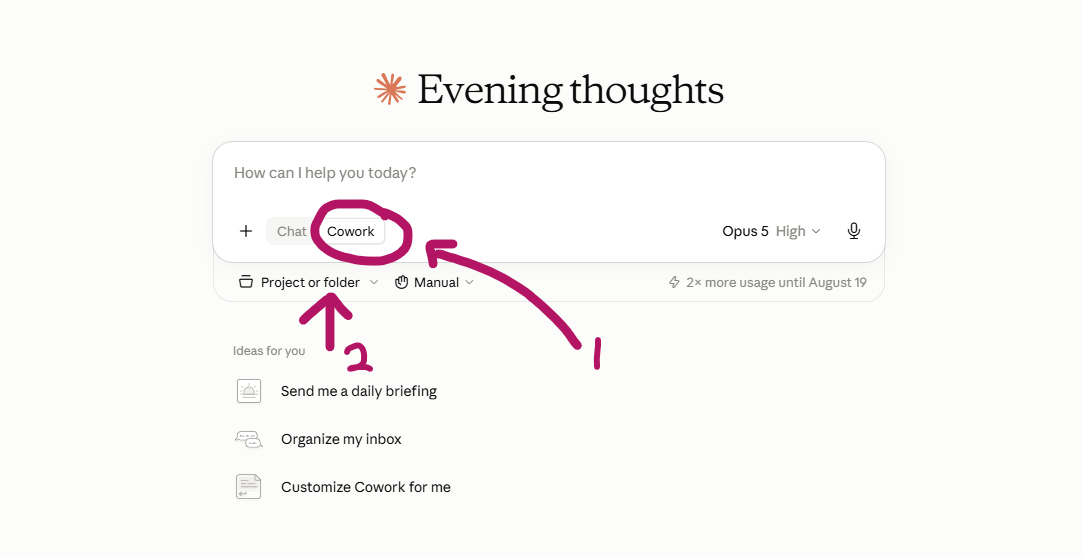
Cowork moves Claude from answering questions to working through a job with your files. Two settings do most of the lean work: the folder you attach and the skills you save.
| Setting | What it does | Lean use |
|---|---|---|
| Folder / project | Gives Cowork a fixed set of files it may read and write in. | One folder per module: syllabus, rubric, slides, exemplars. No hunting for the current version. |
| Skill | A saved set of instructions plus reference files it applies every time. | Standard work: your marking style, your handout format, your session-plan layout. |
| Manual vs auto | Controls whether it acts on its own or waits for you at each step. | Keep Manual while you are still building trust in the output. |
- Create one folder per module and keep only the current versions in it.
- Attach the folder before you prompt, so every answer is grounded in your material.
- Save your repeated request as a skill — name it after the task, not the tool.
- Review the skill each intake and delete the parts you no longer use.
Skill: Weekly session pack for [module].
Files: syllabus.pdf, rubric.pdf, week-slides/ (attached folder only).
Steps: 1) Read this week's topic from the syllabus. 2) Draft a one-page session plan with timings. 3) Draft a learner handout with one worked example and three practice tasks. 4) List the equipment needed.
Rules: use only the attached folder; flag anything the files do not cover instead of inventing it; British English; no learner names.
Output: two files — session-plan.md and handout.md — plus a three-line summary of what I must check.
ChatGPT Work: plugins and skills
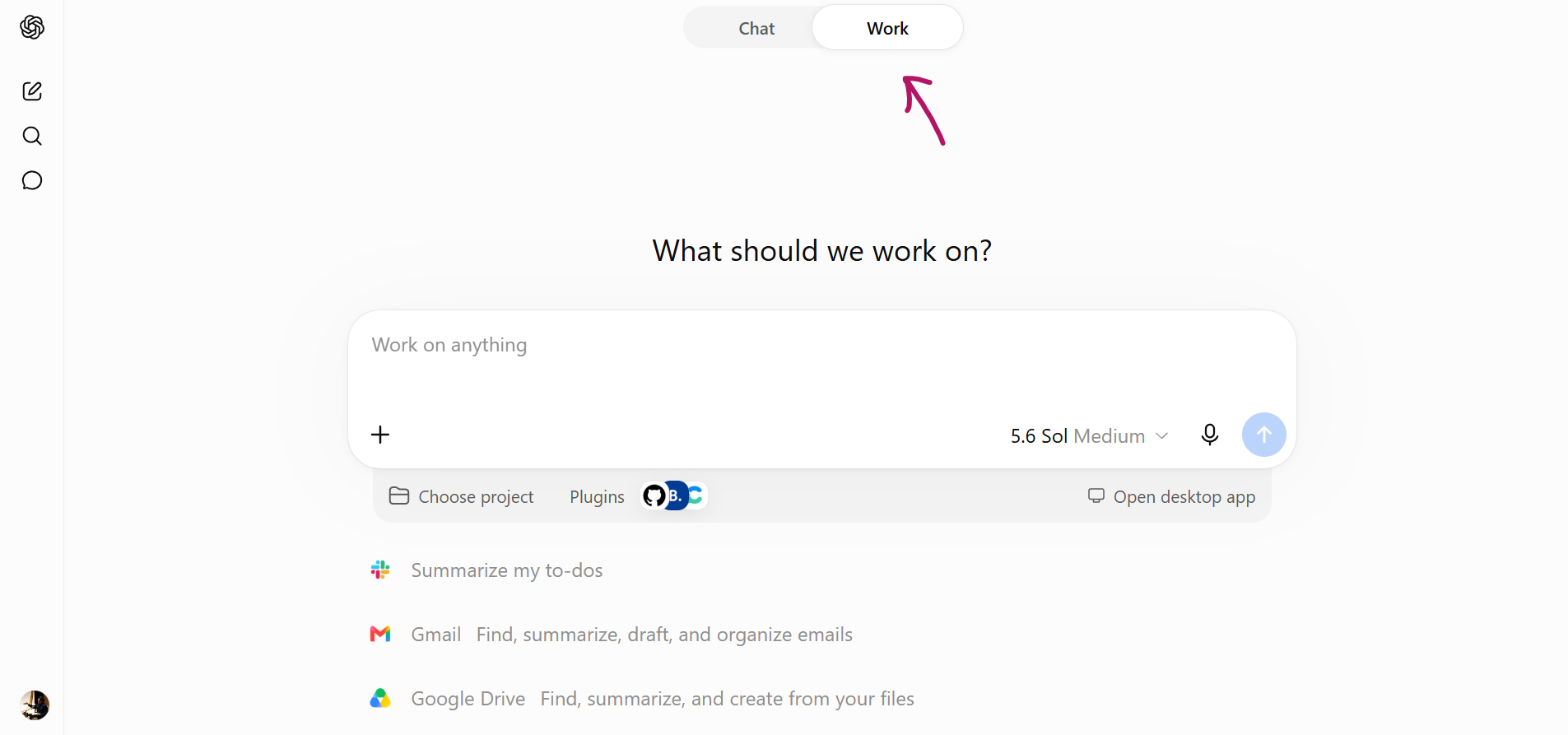
ChatGPT Work does the same job from the other side: instead of a local folder, it connects to the systems your material already lives in, and skills hold the instructions you reuse.
| Setting | What it does | Lean use |
|---|---|---|
| Project | Groups chats and files for one body of work. | One project per module or per intake, so context is not re-explained. |
| Plugins / connected apps | Reads from Drive, Gmail and similar sources. | Pull the live syllabus or feedback form instead of re-uploading copies. |
| Skill | A saved instruction set plus reference files applied on demand. | Marking comments, quiz drafting, announcement rewrites — same shape every time. |
- Connect one source folder, not your whole drive or inbox.
- Never connect anything holding learner records or grades.
- Say in the skill which source is authoritative when files disagree.
- You still approve the output before it reaches learners.
Skill: Draft criterion feedback for [module] submissions.
Sources: rubric.pdf and exemplars/ in the connected module folder only.
Steps: 1) Match the submission to each rubric criterion. 2) Write one specific comment per criterion, quoting the learner's own work. 3) Add one next action the learner can do this week.
Rules: no marks or grades; no comments about the person; if evidence for a criterion is missing, say what is missing; flag anything I should check myself.
Output: a table of criterion, comment and next action, then a one-line summary for my records.
Build one reusable assistant
Turn your most-repeated prompt into a Gem or Custom GPT.
Leave withA saved assistant that produces consistent, checkable output.
Saved in this browser automatically.
Mark it so your progress is kept in this browser.